How Your ChatGPT History Can Become a Personal Playbook

Introduction
Hello, I’m Mia Sato, AI Researcher at GDX.
When I use ChatGPT for work, there are moments when I think:
“I’m pretty sure I already asked for this correction before.”
Start with the conclusion.
Separate confirmed items from items still under review.
Include the owner and deadline in the next action.
Do not fill in unknown information by guessing.
Each correction is small. But when I have to repeat the same instructions every time I start a new chat, the effort slowly adds up.
This idea of taking something I have already explained once and making it reusable for the next task is similar to what I wrote about in a previous article on Codex Record & Replay. In that article, I tried recording a usual screen workflow and reusing it in later tasks.
But screen operations are not the only things we repeat at work.
We also repeat judgment criteria when editing text. For example, how to write the conclusion, how to separate confirmed information from items still under review, and how not to guess when information is missing.
So I wondered whether these judgment criteria could also be saved in a way that makes them reusable for future work.
This time, I tried using ChatGPT’s search function to find past corrections and reuse them as a personal instruction set.
Search can become an entry point to past judgment
Around that time, ChatGPT’s search function was updated on July 14, 2026.
It was already possible to search past chats before, but with this update, users can search chats, Projects, images, and documents from the same place. It also became possible to filter results by content type and directly open the relevant chat or file.
For example, when searching for “ChatGPT Work,” related chats and files can be found together.
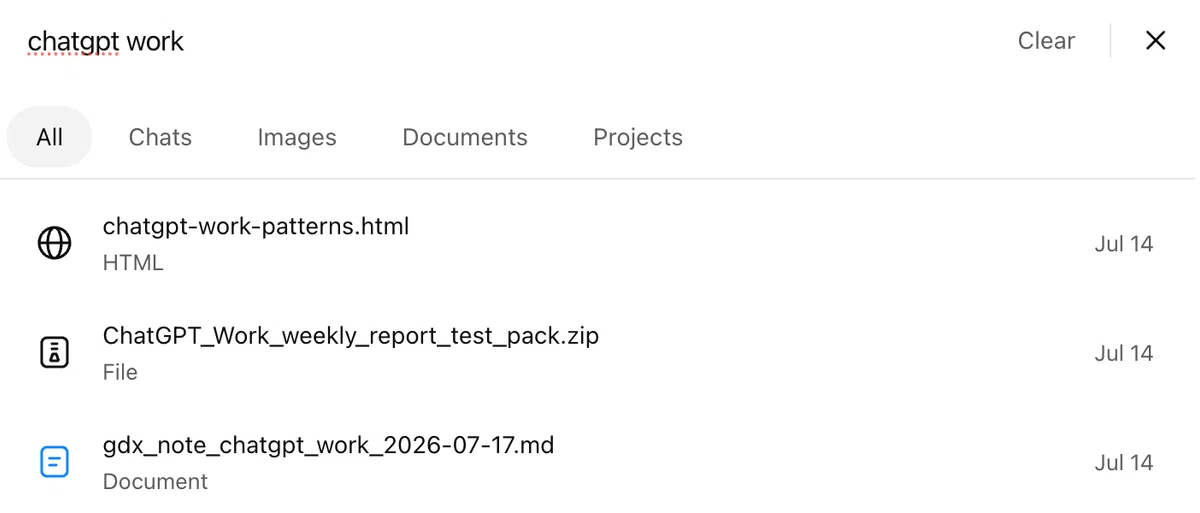
For example, searching for “ChatGPT Work” makes it possible to find related chats and files together.
Then, on July 15, Custom Instructions also became able to store longer instructions than before. This makes it easier to save multiple judgment rules, such as “Do not guess unknown information” and “Clearly mark anything that requires confirmation.”
Find past instructions, then save the rules you want to reuse going forward.
By combining these two updates, I thought it might be possible to carry previous corrections into the next task.
What I tried: Searching for corrections to a weekly progress report
For this test, I chose a weekly progress report, a format used in many workplaces.
I tested whether past corrections could be reused for future work using the following flow.
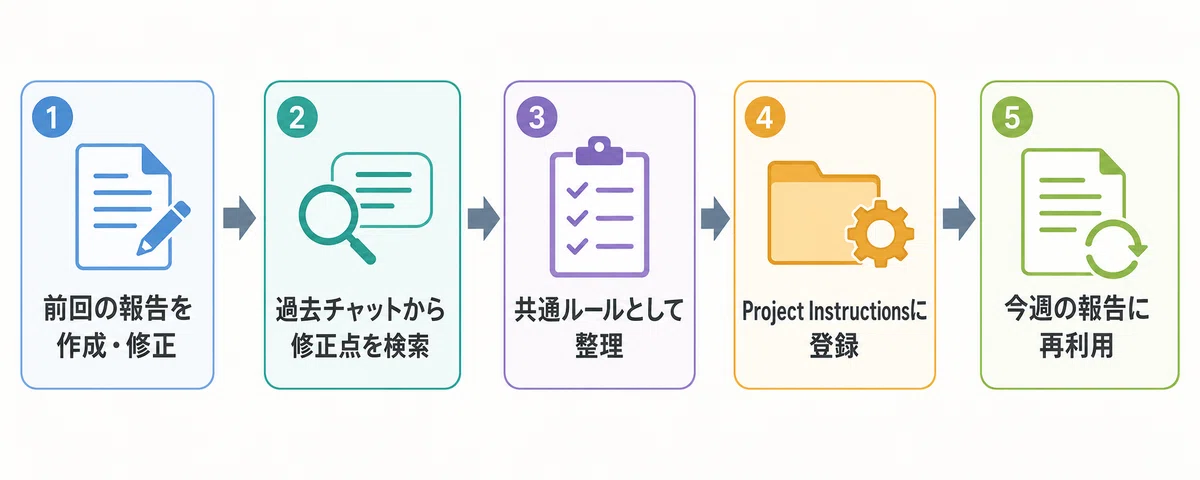
Workflow for reusing past corrections
First, I gave ChatGPT a short work memo like the one below and asked it to create an internal update message.
・Product page draft is complete
・Images are being reviewed by the design team
・Image review deadline is July 25
・Product registration will start after images are finalized
・Publication date has not been decided yet
When generating a report from this kind of memo, the content may be organized, but items still under review can look as if they are already confirmed. It may also be unclear who is responsible for the next action and by when.
In the past, I had made corrections like these to generated reports:
- Write the overall status in one sentence at the beginning
- Separate completed items, items under review, and undecided items
- Include the owner and deadline in the next action
- Do not guess unknown owners or dates
So I searched using words I had used during those corrections, such as “under review,” “next action,” and “owner and deadline.”
With search, I did not need to remember the title of the conversation. I could look for related chats using distinctive words from past exchanges.
However, vague phrases such as “the previous report” or “that document” were harder to search for. I found it easier to narrow down results by using actual phrases, file names, or Project names.
Classifying past corrections into three types
After finding the original conversation, I used the following prompt to organize the corrections.
Please extract the conditions I added to the original request and the corrections I made after the output in this conversation.
Please classify the extracted content into the following three groups.
1. Basic rules used for all work
2. Rules used for weekly progress reports
3. Conditions used only this time
For each rule, briefly show which statement it was based on.
Do not add anything that was not written in the conversation by guessing.
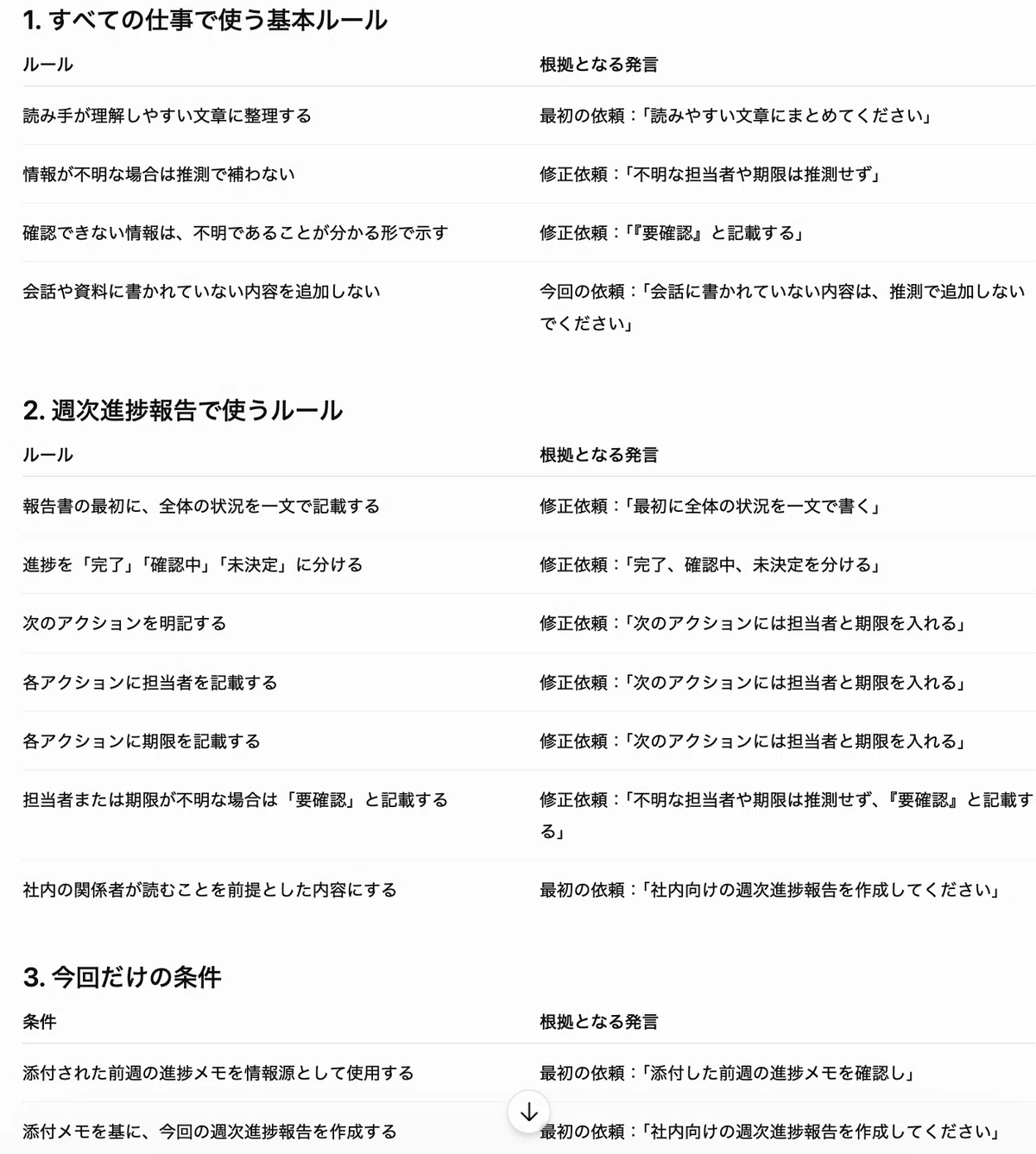
Screenshot: Past corrections classified into three groups
Once organized, it became clear that the conditions I had given before should not all be saved in the same place.
“Do not fill in missing information by guessing” can be used not only for reports, but also for emails and document creation.
On the other hand, “separate completed, under review, and undecided items” is a rule I especially want to use for progress reports. A date such as “July 25” is a condition for that specific task only.
Saving rules in different places depending on their type
I divided the organized instructions into three places.
1. Basic rules go into Custom Instructions
This is where I save conditions I want to use across many types of work.
Do not fill in information that cannot be confirmed by guessing. If the owner, deadline, or numbers are missing, clearly mark them as “needs confirmation.”
2. Weekly report rules go into Project Instructions
For the Project where I create weekly reports, I set instructions like the following.
Please organize weekly progress reports in the following order.
1. Overall status
2. Completed items
3. Items under review or undecided
4. Next actions, owners, and deadlines
Project Instructions are used only inside that Project. This makes it easier to prevent the weekly report format from affecting unrelated tasks such as translation or general writing.
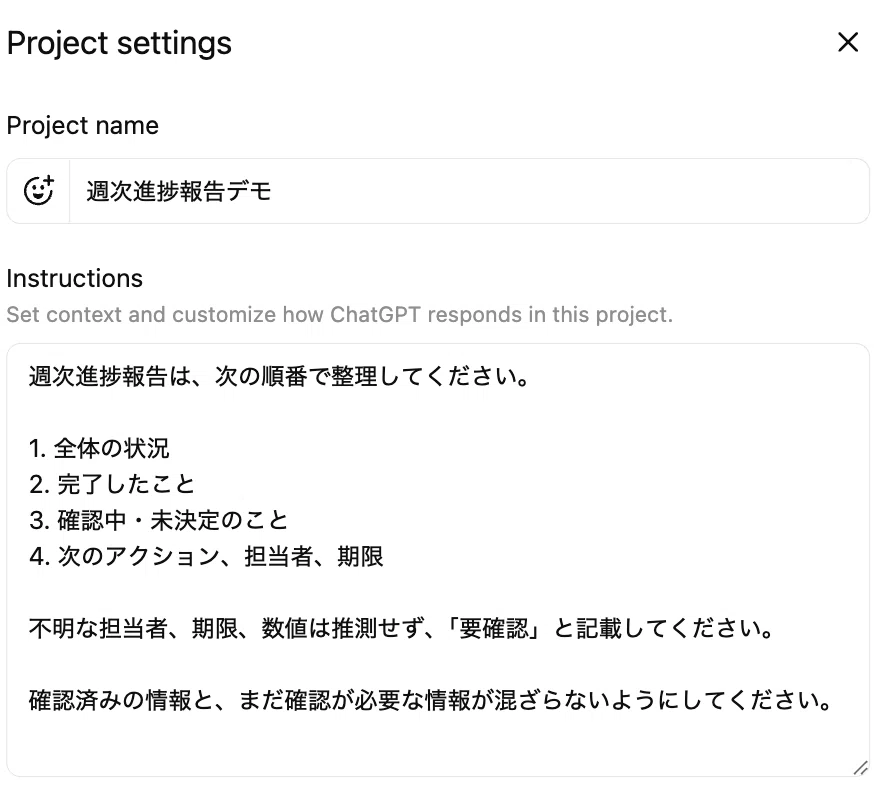
In Project settings, reusable instructions can be entered in the “Instructions” field.
3. Dates and task-specific details stay in the prompt
Deadlines, owners, project names, and other details used only for the current task are not saved. I include them in each prompt instead.
By separating rules from task-specific information, it becomes less likely that an old deadline or owner will accidentally be reused in a later report.
Trying again with a new memo
After setting the instructions, I used a memo from another week and asked ChatGPT to create a report with a short request.
Please create an internal weekly progress report from the attached progress memo for this week.
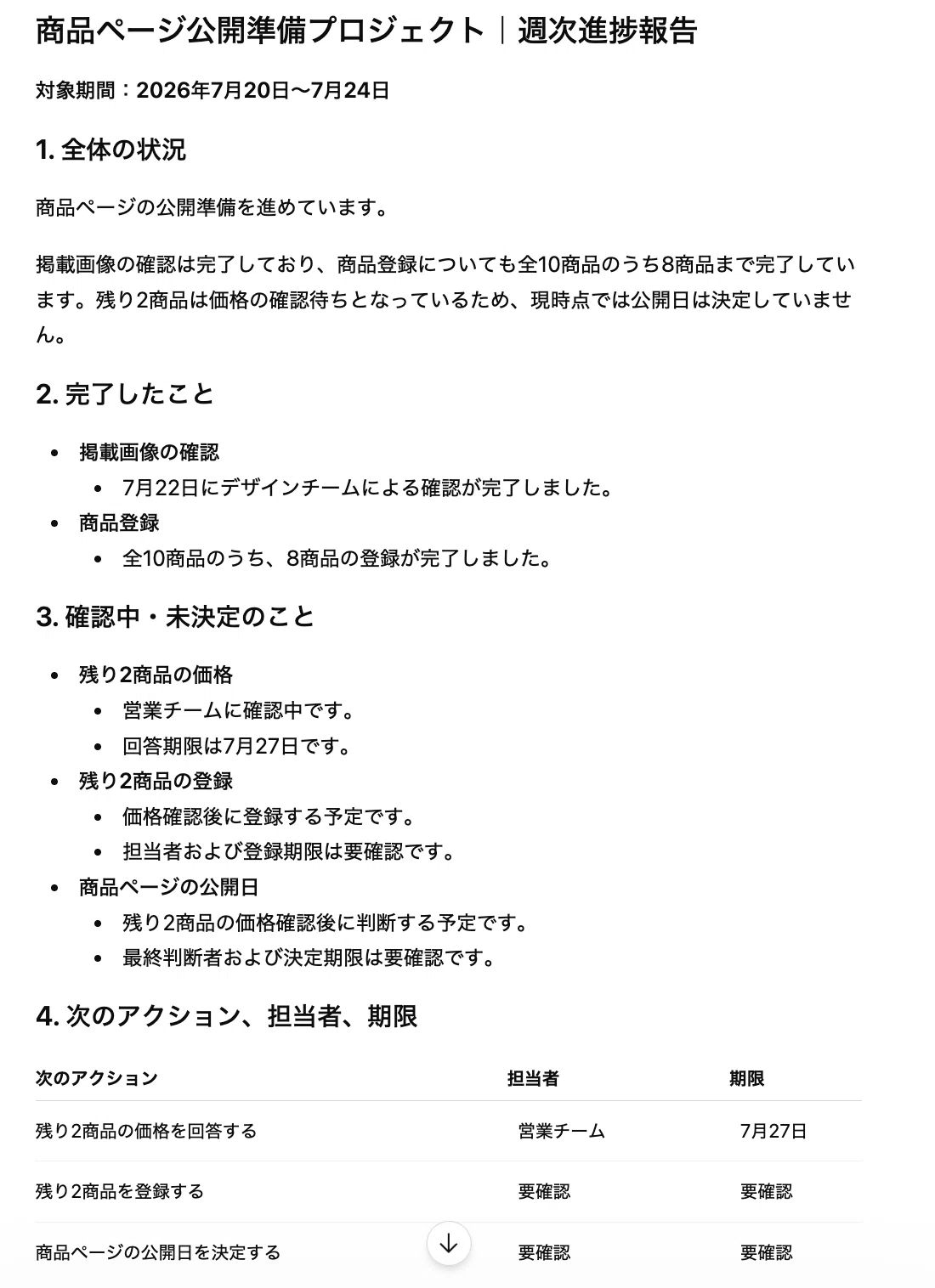
Screenshot: A new weekly progress report created using the saved instructions
What I wanted to check was not only whether the writing became smoother.
- Does it start with the overall status?
- Are completed items and items under review separated?
- Are the next actions clear?
- Is it avoiding guesses about unknown owners or deadlines?
By checking these points, I could see whether previous corrections were reflected in the next task.
It will take a few weeks of use to measure how much time this actually saves. Still, at least I no longer needed to explain the same report format every time. I could start by providing only the latest work memo.
Do not reuse found instructions without review
One thing to be careful about is that rules found in past conversations are not always still correct.
The audience for the report or internal rules may have changed. An item that was necessary before may no longer be needed now.
So before adding something to an instruction set, I check the following points:
- Can this still be used in the current workflow?
- Was this the rule I finally adopted?
- Does it conflict with any other instruction?
- Does it include any condition that was only for that specific task?
Search is not a feature that automatically turns past content into the correct answer.
People still need to decide what should be kept for future use.
Conclusion
With Record & Replay, I saved repeated screen operations as reusable Skills. This time, I used ChatGPT’s new cross-content search to find corrections and judgment criteria buried in past conversations, then saved them as Custom Instructions and Project Instructions.
Through these two tests, I felt that when we ask AI to handle work, it is important not only to save the task itself, but also to put into words how people think and make judgments during that task.
Screen operations can be saved as procedures. Thinking patterns and judgment criteria can be saved as instructions. Then, next time, we do not have to explain everything again. We can start by providing only the information that has changed this time.
At GDX, we believe that the core of AI adoption is not simply handing work over to AI. It is turning the tacit knowledge inside people’s work into reusable assets that AI can use.
References
- Official: ChatGPT Release Notes / OpenAI Help Center / OpenAI Help Center
- Official: How do I search my chat history in ChatGPT? / OpenAI Help Center / OpenAI Help Center
- Official: ChatGPT Custom Instructions / OpenAI Help Center / OpenAI Help Center
- Official: Projects in ChatGPT / OpenAI Help Center / OpenAI Help Center
※ Part of this article was created with the support of AI and edited by the author. This article summarizes a test conducted by the author based on GDX’s approach to AI adoption. Please refer to official announcements and primary sources for the latest details about features and specifications.