How ChatGPT Work Is Changing AI Delegation — From Micromanaging Every Step to Choosing the Right Tasks Up Front
Introduction
Hello, I’m Mia Sato, AI Researcher at GDX.
In my previous article, I wrote that when we want to delegate work to an AI agent, it is important to design rules that make it easier for the AI to make judgments.
Define the goal and the stopping point.
Align the judgment criteria.
Ask the AI to stop instead of guessing when it is unsure.
In short, the idea was to prepare an environment where AI can work more safely and smoothly.
But while writing that article, I also had another honest thought.
“If people have to design all of that from scratch every time, that is still quite a lot of work.”
After trying ChatGPT Work, which OpenAI announced on July 9, 2026, my view changed a little.
ChatGPT Work, powered by GPT-5.6, is an agent designed to gather information from apps and files, think through the workflow, and create finished outputs such as documents, spreadsheets, and slides.
What stood out to me most was that it does not only help with the task itself. It also suggests a draft plan for how the work should be done.
In this article, I will look at what changes when AI proposes the plan first, and people review that plan at the entrance of the workflow.
It returns not just an answer, but a finished output
Even before ChatGPT Work, ChatGPT could summarize documents and analyze data.
But for workflows such as summarizing sales data, classifying customer feedback, following the same format as last week’s report, and turning the result into slides, people often had to give instructions again at each step.
With ChatGPT Work, you first tell it what final output you want. Then it breaks the task into smaller steps and tries to continue the work across multiple stages.
OpenAI describes ChatGPT Work as an agent that works across apps and files to turn a goal into a completed deliverable.
My impression is that it feels less like a conversation partner and more like someone who thinks through how to get the work finished.
Plan mode creates a draft for how to delegate the work
The feature I paid the most attention to was Plan mode.
ChatGPT Work does not immediately start working. It first gathers the necessary information, asks questions, and presents a plan that says, in effect, “I will proceed in this order.”
People can then review that plan before the work begins. If the scope, analysis method, or output format is off, they can correct it at the start.
At the same time, the more an AI agent works on its own, the bigger the rework becomes if the first direction is wrong.
If you notice a wrong judgment standard only after the AI has already created tables and slides, you may need to fix the later steps as well.
That is why I think Plan mode should not be seen as a feature that removes human review.
It is better to see it as a feature that moves the human review point to the entrance of the workflow.
What I tried: Creating a weekly report from three files
I prepared three files: an Excel file with daily sales data, a text file with customer comments, and last week’s report template.
All of them used fictional data for testing.
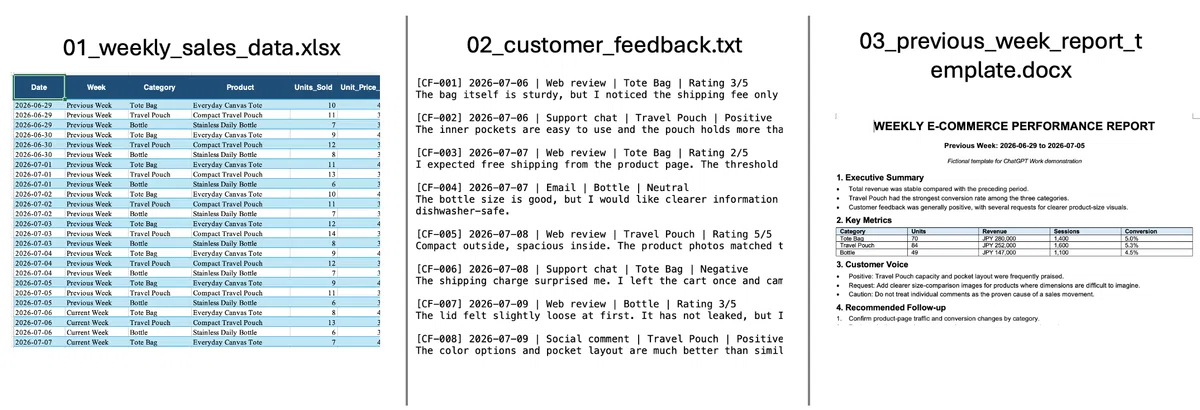
Screenshot of the test data
The task I gave was to analyze the sales data and customer comments, refer to the previous week’s report, and create two outputs.
One was a one-page weekly report summarizing the important points, issues, and next things to check. The other was a three-slide deck for internal sharing.
Prompt:
Please review the following three files and create this week’s EC weekly report.
Input files:
1. 01_weekly_sales_data.xlsx
2. 02_customer_feedback.txt
3. 03_previous_week_report_template.docx
Goal:
Organize the sales data and customer comments. Use the structure and writing style of the previous week’s report as a reference, and create outputs that can be shared internally.
Outputs to create:
・One-page weekly report
・Three-slide deck for internal sharing
Slide 1: Key points for this week
Slide 2: Changes by category
Slide 3: Customer comment trends and next items to check
Before starting the work, please use Plan mode to present an execution plan and wait for my approval.
Please include the following in the plan:
・How each file will be used
・How the sales data will be compared
・How customer comments will be classified
・How the report and slides will be structured
Basic rules:
・Always recalculate numbers from the Excel file
・Classify customer comments by similar themes
・Do not infer information that cannot be confirmed. List it as missing information
・After completion, check that the numbers in the report and slides match
The actual prompt used in the test
What I wanted to test was not just whether ChatGPT Work could summarize the files.
I wanted to see whether it could read files in different formats, connect numbers and text, refer to the format of an existing report, and create two types of outputs in one continuous workflow.
I first provided the three files and the output requirements, then asked it to show an execution plan in Plan mode before starting the work.
The plan it proposed organized the work into several steps: compare this week’s sales with the previous week, classify customer comments by theme, review the structure of the previous report, then create the report and slides.
But when I looked at the plan, one point felt a little vague.
It was not clear how the AI would connect changes in sales numbers with customer comments.
In this test data, tote bag sales had declined, and comments about shipping fee display appeared during the same period. But just because two things happened at the same time, we cannot conclude that the shipping fee display caused the sales decline.
So before letting it start, I asked it to add two rules to the plan.
First, do not claim a cause based only on comments. Second, separate confirmed facts, trends that can be read from the materials, and hypotheses that require further checking.
Instead of fixing each expression after the final report was completed, I added the judgment criteria before the work began.
This is where I felt the value of AI creating a plan first, and humans reviewing it at the entrance.
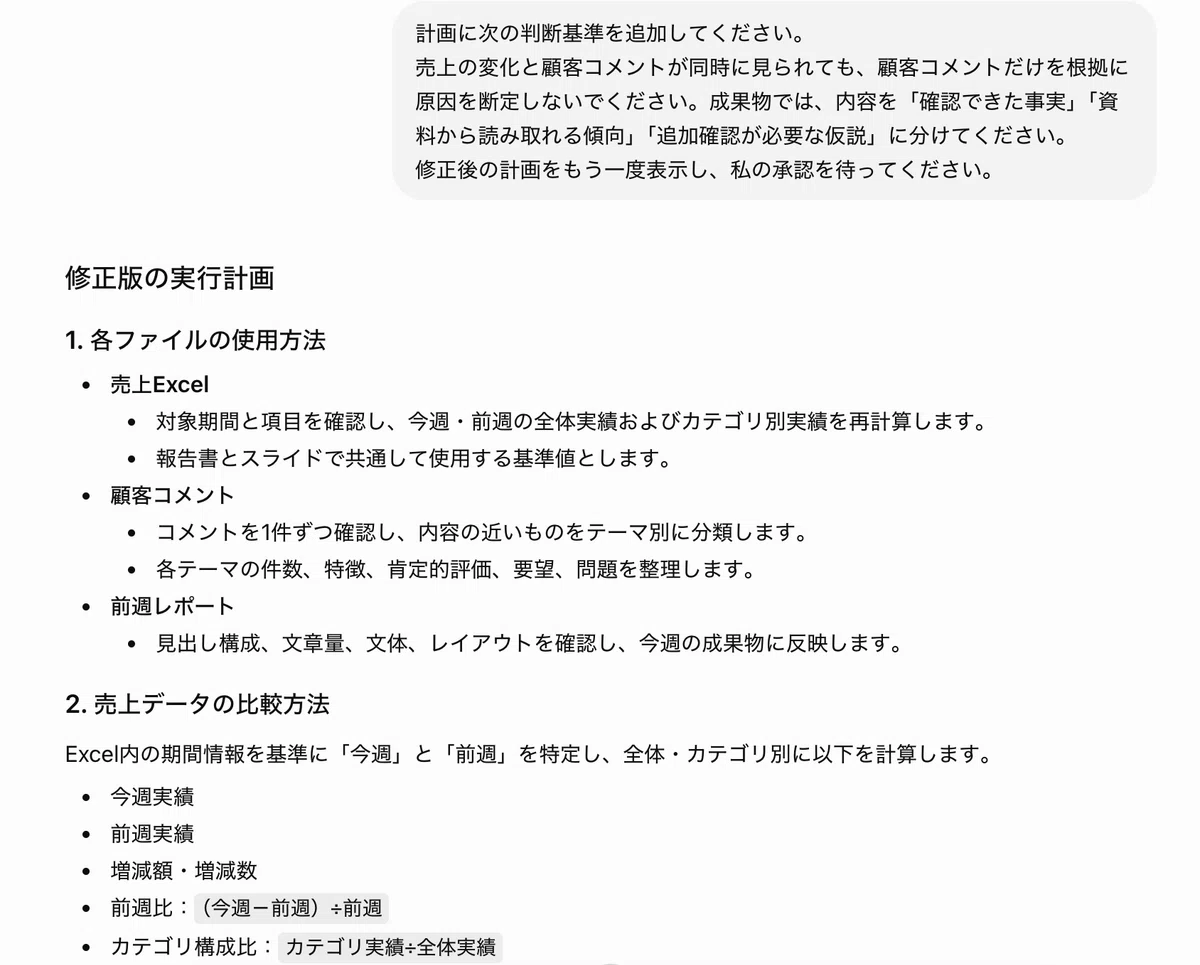
The execution plan proposed by ChatGPT Work and the judgment criteria added by the user
After revising the plan, I asked it to proceed with the task.
The completed weekly report organized the changes in sales from the previous week, product-level trends, and repeated themes found in customer comments.
The slide deck also followed the requested three-slide structure: this week’s key points, changes by product category, and customer comments with next items to check.
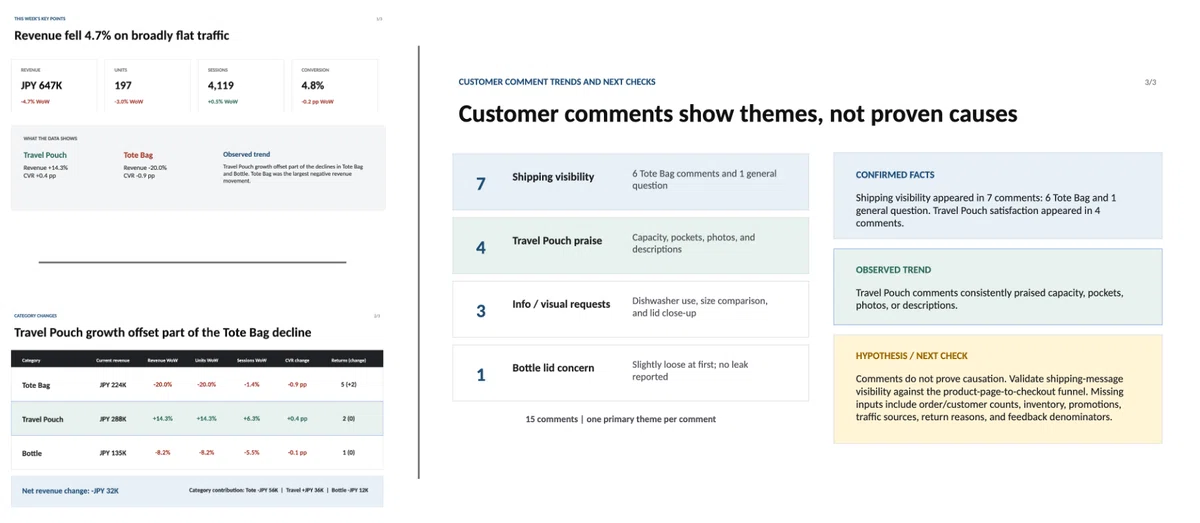
Weekly report and internal sharing slides created from the three files
What impressed me was that the Excel aggregation, text classification, review of the previous report format, report writing, and slide creation were connected as one workflow.
I did not have to keep adding instructions such as “Next, make a table” or “Now turn this into slides.” Once the plan was confirmed, it moved toward the final outputs.
On the other hand, I did not share the completed materials as they were. I reviewed them myself.
I checked whether the numbers in the report and slides matched, whether the classification of customer comments was biased, and whether facts and hypotheses were clearly separated.
Even if AI handles research, organization, and document creation, the final review and official sharing should still remain with people.
I think that role division is still important, even with tools like ChatGPT Work.
The human role shifts from giving detailed instructions to reviewing the starting point
What I felt through this test is that designing how to delegate work does not disappear.
Instead, the way we design it is starting to change.
Until now, people often had to write the goal, steps, and judgment criteria from scratch.
From now on, I think we will see more cases where AI proposes a plan first, and people review the scope and criteria before execution.
What people need to check is whether the output format matches the purpose, whether the AI separates what can and cannot be said from the materials, whether it avoids filling missing information with guesses, and whether the final human review point is clear.
The more AI works autonomously, the more important it becomes to decide the direction at the beginning, rather than giving many small instructions in the middle.
Conclusion
After trying ChatGPT Work, what stayed with me most was not only that it could create finished outputs.
It was that AI is beginning to propose how the work itself should proceed.
This does not mean the human role disappears. It simply moves a little further upstream.
People review the plan created by AI, align the judgment criteria, and take responsibility for final approval.
If the previous article was about creating rules so AI does not get lost, this article was about reviewing the workflow plan AI creates before the work begins.
It is difficult to keep up with every new feature every time a new tool appears.
But if we have our own pattern for how to delegate work, we can start using new tools with the same basic mindset.
The best place to start is a small task where we can review the result ourselves.
By reviewing the AI’s plan, we can put into words the standards we usually use without thinking. That, I believe, is what leads to more stable collaboration between people and AI.
References
- Official: ChatGPT Work with GPT-5.6 / OpenAI / OpenAI
- Official: ChatGPT is now a partner for your most ambitious work / OpenAI / OpenAI
- Official Help: ChatGPT Work and Codex / OpenAI Help Center / OpenAI Help Center
- Reference: Desktop ChatGPT major update, AI agent Codex integrated into ChatGPT Work / ITmedia AI+ / July 10, 2026 / ITmedia AI+
- Reference: ChatGPT Work announced, Codex app integrated into ChatGPT app / Weekly ASCII / July 10, 2026 / Weekly ASCII
※ Part of this article was created with the support of AI and edited by the author. The content reflects the author’s personal views and does not represent the official views or statements of GDX Inc. The information is provided for reference purposes only. Please refer to official announcements and primary sources for the latest details.