【AI INSIGHTS】Rethinking E-commerce Testing with AI-How Much Risk Can We Reduce with Limited Time?
Hello, I’m Mia Sato, an AI researcher at GDX.
GitHub recently introduced Copilot Browser Use, a feature that allows AI to interact with websites, click buttons, enter information, and inspect what appears on screen. The first thing that came to mind was the testing we do after updating an e-commerce site.
Whenever we update a product page, we need to check that images and size options display correctly, that customers can navigate to the page from a product listing, and that everything works on mobile. Each check may only take a moment, but the workload quickly adds up when there are multiple pages to review.
AI could help us test pages we previously did not have time to cover. But even if it checks 100 pages and reports that everything is working, what happens if the test plan itself overlooks something important?
Rather than focusing solely on automating test execution, I wanted to explore how AI might help us decide what to test, how thoroughly to test it, and where to spend our limited time.
Beyond automating browser interactions
GitHub Copilot Browser Use is currently available in public preview. Through a browser extension, Copilot can interact with web applications, carry out tests, and fill out forms. Its potential applications extend well beyond e-commerce.
In a test environment, for example, you could ask Copilot to select a product, add it to the cart, and verify that the correct quantity appears.
Automated testing is hardly new. What makes this approach interesting is the ability to describe the behavior we want to verify in everyday language.
I have tested web pages using another browser automation tool before, and one lesson stood out: being able to click a button is not the same as confirming that it works as intended.
Before a test begins, we need to define what a successful outcome actually looks like.
That led me to a broader question. Now that AI can carry out browser interactions, could it also help us identify gaps in our test coverage before testing even begins?
Identifying what actually needs to be tested
In a product registration prototype I previously worked on, the pre-release checklist covered size options, product images, categories, product lineups, add-to-cart functionality, and mobile display, among other things.
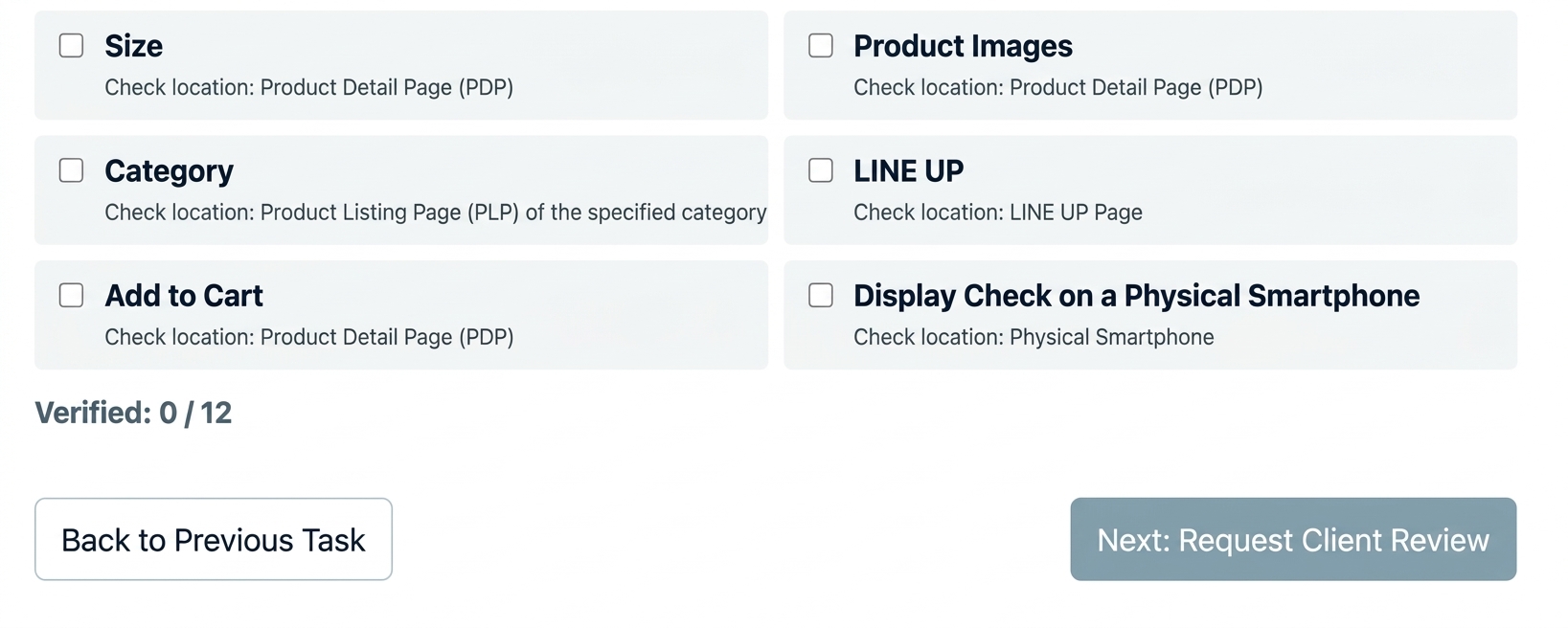
E-commerce testing rarely ends with a single page. Suppose we change the way customers select a product size. It is not enough to check that the size selector works on the product detail page.
We also need to know whether stock availability is displayed correctly and whether the selected size carries through to the cart and the final order.
Teams have traditionally identified these test cases by reviewing specifications and the scope of each change. However, the breadth of those checks can vary depending on the experience and knowledge of the person preparing them.
One possible approach is to give AI the relevant specifications, details of the proposed changes, existing checklists, and previous bug reports, then ask it to suggest additional test cases.
Instead of covering only the standard purchase journey, it could help identify scenarios involving out-of-stock products or customers changing their selections partway through the process.
Of course, AI cannot reliably infer specifications it has never been given. Teams still need to check whether the suggested tests reflect the actual system and whether any relevant information is missing.
The opportunity, then, is not simply to have AI work through an existing checklist. It is to use AI to improve the checklist itself, potentially broadening test coverage in areas where it has traditionally depended on individual experience.
What should we prioritize when testing time is limited?
Identifying more test cases does not mean we have the time or resources to examine every one of them with the same level of attention.
While looking into this problem, I came across a useful concept: risk-based testing. It is an established approach to test planning that prioritizes checks based on both the likelihood of a defect and the severity of its potential impact.
AI could help assess those risks by organizing information about previous incidents, the scope of recent changes, and their potential impact on customers and revenue. Where there is not enough information to assess a risk, the item should remain open rather than automatically being classified as low risk.
From there, the team can decide which tests to run and how to run them, taking into account both available staff time and the limits of what AI can reliably verify.
For example, a test plan for an upcoming product page update might divide responsibilities as follows.
E-Commerce Test Plan (Illustrative Example)
| Test Item | Potential Risk and Priority | Verification Method |
|---|---|---|
| Links and Required Fields | Customers cannot access the information they need (Medium) | Use AI for broad coverage |
| Product Images and Size Display | Misunderstandings about products or product returns (Medium to High) | Cross-check with AI, followed by targeted human review |
| Pricing, Discounts, and Payments | Incorrect charges or inability to complete a purchase (High) | Independent verification by both AI and human testers |
| Display on Less Common Older Devices | Some customers may be unable to use the site (Requires Assessment) | Decide whether to test based on actual device usage |
Priorities and responsibilities are illustrative. Actual decisions should reflect the scope of the changes, usage patterns, and the level of reliability required.
Suppose the team has only two hours available for manual testing. AI could help generate several possible test plans based on estimated testing time, the risks involved, and the checks it can perform itself.
Once sufficient time has been allocated to critical purchase flows, the team can compare where the remaining time would make the greatest difference in reducing overall risk.
The plan should not assume that AI can verify everything. It also needs to account for AI's limitations and the time required to review its findings. If there is still not enough time, reducing the scope of the release may be another option.
The goal is not simply to transfer work from people to AI. It is to find a combination of human and AI-assisted testing that reduces more risk within the same time budget.
I would also want the test plan to identify checks that cannot be completed before release and the risks that remain as a result. This gives the team a chance to consider additional measures early, rather than discovering gaps in coverage just before launch.
The overall process can be illustrated as follows.
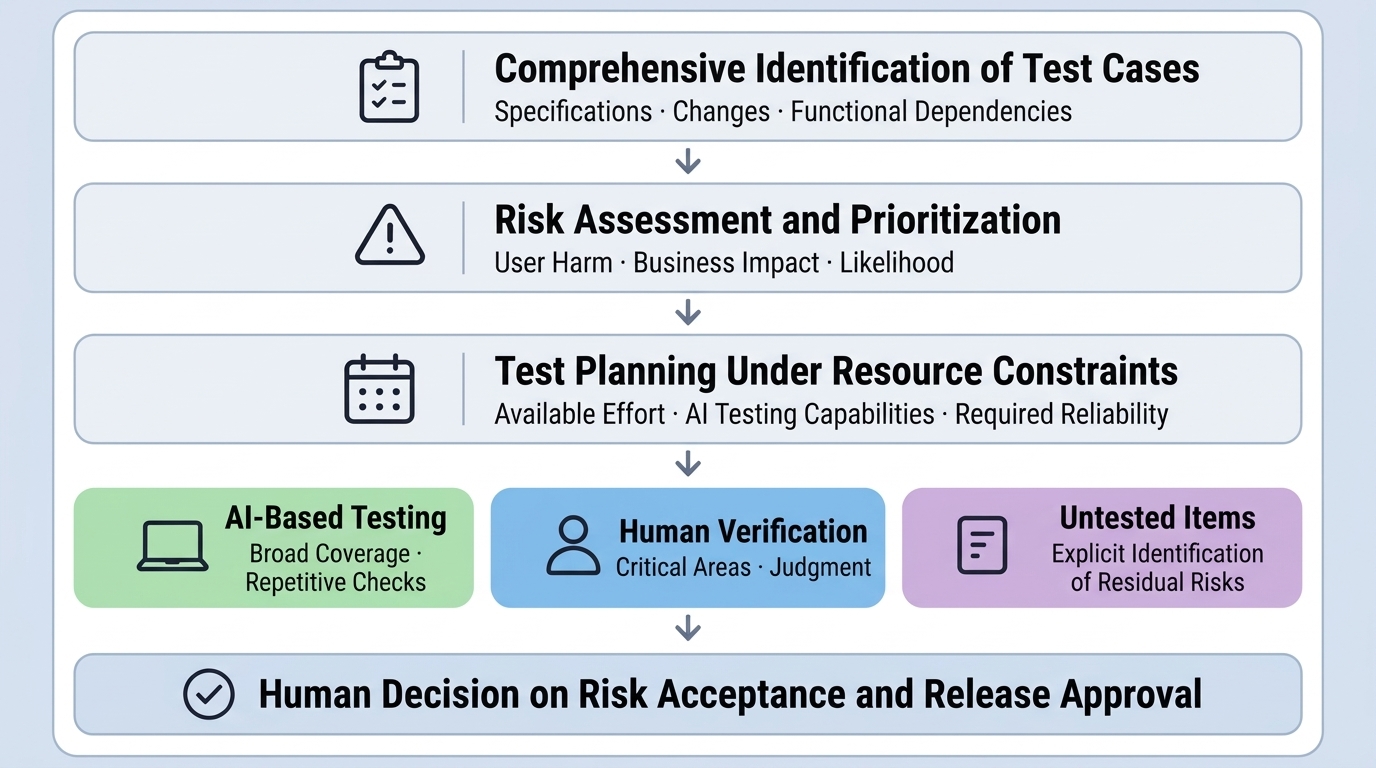
Figure: The workflow from AI-assisted test design to the final release decision.
What a perfect pass rate does not tell us
Once testing begins, the next question is how much we have actually verified. Successfully opening a page is very different from confirming that the underlying functionality behaves as expected.
I would want to define the test scope and acceptance criteria in advance, then record the actual outcomes alongside them. Any tests that could not be completed or were deliberately deferred should be recorded separately from those that passed.
E-Commerce Test Results Summary (Hypothetical Example)
| Status | Count | Next Action |
|---|---|---|
| Passed | 482 | Review a sample of passing results |
| Failed | 12 | Investigate the cause and resolve the issue |
| Inconclusive | 6 | Determine why testing was interrupted and rerun the tests |
| Not Executed | 20 | Assess remaining risks |
| Total | 520 | Proceed to the go/no-go release decision |
These figures are hypothetical and are provided solely to illustrate the process. They do not represent actual test results.
The 18 failed or inconclusive cases and the 20 tests that were not executed should be reviewed according to their associated risks. But I would also review a sample of the tests that passed.
After all, reviewing failed tests alone will not reveal problems that AI failed to detect in the first place. The sample should cover a representative range of product types, devices, and areas affected by the update.
If a result raises concerns, the team should be able to trace the actions performed during the test and understand exactly what criteria were used to classify it as successful.
Making the risks of untested scenarios visible
The part of this example that deserves particular attention is the 20 tests that were never executed.
An inconclusive result means a test was attempted but no definitive outcome could be established. A test classified as not executed, on the other hand, has not yet been performed.
Suppose we decide to skip testing on older devices because of time constraints. Even if relatively few customers use those devices, there is still a possibility that some of them will be unable to click the purchase button.
To assess whether that risk is acceptable, we would need to consider actual device usage and whether customers have practical alternatives.
AI could help organize the tests that remain outstanding and their potential consequences. This would give the team a clearer basis for deciding whether to conduct further checks, postpone the release, or proceed while accepting the remaining risk.
Even completed tests may contain overlooked problems, so the final release decision should remain with people.
If manual sampling reveals an issue that AI missed, the team can expand testing to products or scenarios with similar characteristics and reassess whether the issue affects the planned release.
Recording the actual time spent on manual testing, along with any issues AI overlooked, would also make it easier to identify where testing resources should be concentrated next time.
Better use of testing time matters more than running more tests
Initially, I was interested in how much testing work AI could take off our hands. Now, I am more interested in what we could do with the time it frees up.
We could test scenarios that previously went unchecked because of time constraints. We could identify potential problems that individual team members might not think to look for. And we could devote more attention to protecting the shopping experience that customers expect every day.
The opportunity is not just to finish the same work faster. It is to achieve more within the time we already have.
For me, that was the most interesting takeaway from exploring Copilot Browser Use. AI may help us rethink not only how we execute tests, but how we design our testing process in the first place.
References
- GitHub, “Let GitHub Copilot interact with your browser”
https://github.blog/changelog/2026-11-17-let-github-copilot-interact-with-your-browser/ - GitHub Docs, “About browser use in GitHub Copilot”
https://docs.github.com/en/copilot/concepts/agent-capabilities/agent-powered-workflows-and-operations/browser-use - Google Cloud, “A methodical approach to agent evaluation”
https://cloud.google.com/blog/topics/developers-practitioners/a-methodical-approach-to-agent-evaluation - ISTQB Glossary, “Risk-based testing”
https://glossary.istqb.org/en_US/term/risk-based-testing
Parts of this article were developed with the assistance of ChatGPT and subsequently reviewed and edited by the author. The views expressed are those of the author and do not represent the official position or statements of GDX Inc. This article is for informational purposes only. Please consult official announcements and primary sources for further details.