From Excel to PowerPoint, Faster: How Claude Cowork’s Integration Push Changes Day-to-Day Work
Introduction
I’m Mia Sato, an AI researcher at GDX Co., Ltd.
Anthropic has expanded “Claude Cowork,” broadening the range of business tools it can connect with—such as Google Workspace, DocuSign, and WordPress. They’ve also signaled a direction toward bundling multi-step, cross-app work—like moving from Excel to PowerPoint—so tasks can be carried through end to end.
This article covers three things:
What’s been added (new integrations and cross-app workflows)
Which “busywork” in EC operations could realistically get shorter
Where teams tend to get stuck before rollout—cost, validation, and data handling
At GDX, we often hear concerns like:
“We delivered the ad report, but the discussion still starts from re-explaining the background.”
“Inventory, promotions, and price changes are scattered across places, so decisions take too long.”
The data exists, but teams spend a lot of time aligning on assumptions—re-reading and re-confirming what everyone already has. Here, I’ll organize the update from the perspective of reducing that “shared context” overhead.
How to choose between Claude Chat, Claude Code, and Claude Cowork
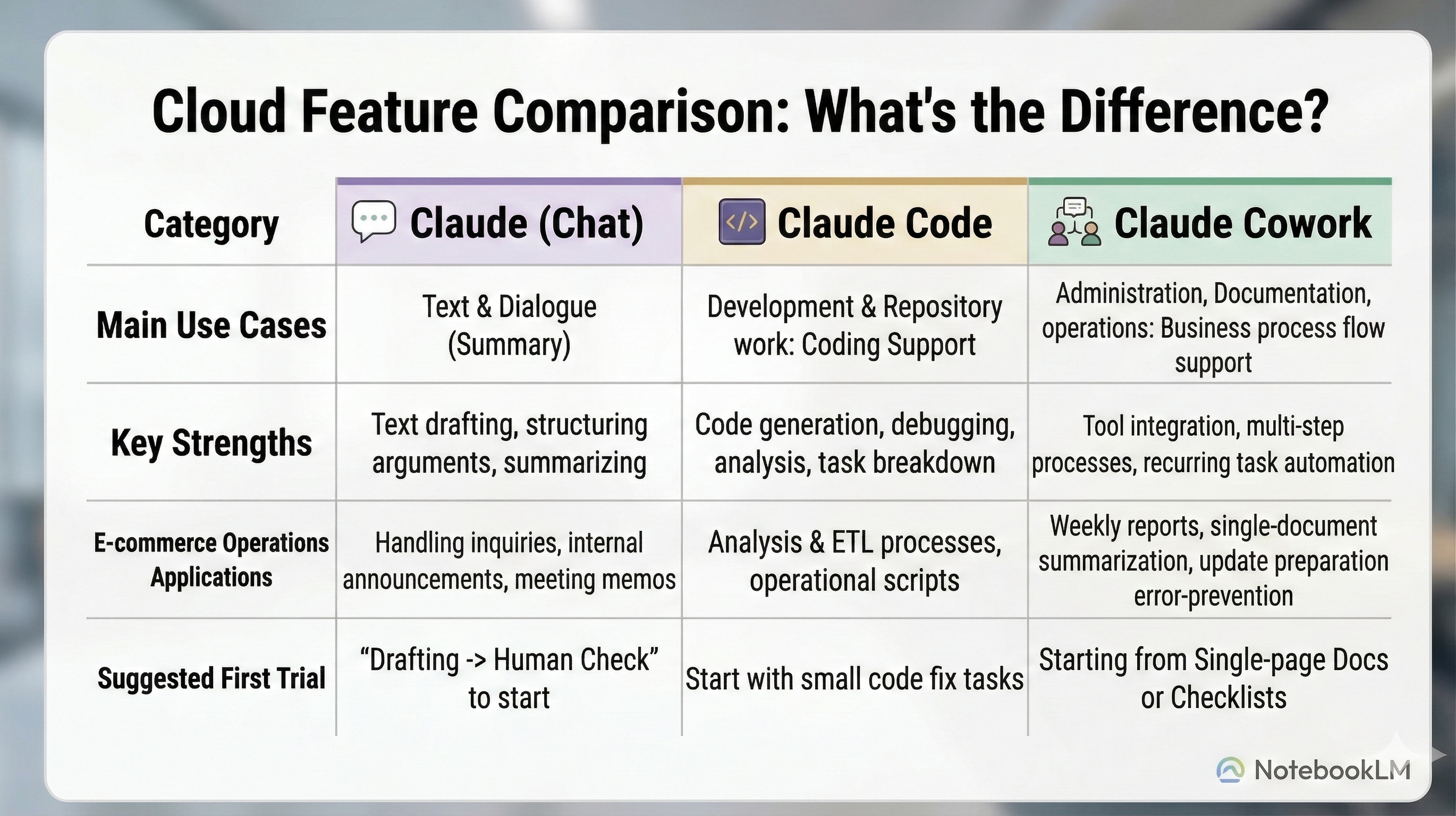
Before we get into the Cowork update, it helps to clarify how Claude Chat, Claude Code, and Claude Cowork differ—and when to use each. Once you have this straight, it becomes much easier to see where Cowork fits.
In one line:
Claude Chat is where you think: strong at summarizing, drafting, and structuring decisions.
Claude Code is where you build: designed to accelerate coding and terminal workflows.
Claude Cowork is where you work with files: built for tasks that span multiple tools and documents.
What’s changing with Anthropic’s Claude Cowork?
Now to the main topic. This update points to three major directions:
More integrations: Closer to the tools people actually live in—Google Workspace, DocuSign, WordPress, and others.
Easier cross-app workflows: Smoother paths for sequences like “analyze in Excel → report in PowerPoint.”
A “draft + human review” operating model: For important deliverables, the safe default is drafting first and validating before finalizing.
Below, I’ll organize this as: facts → practical implications → what we can responsibly say as “confirmed.”
Facts: What was announced
Anthropic has expanded enterprise integrations (connectors/plugins), signaling a stronger push toward connecting with internal tools.
Use cases that span multiple apps—like Excel ↔ PowerPoint—are being positioned more prominently, emphasizing workflow-oriented productivity.
Practical implications: What might get easier on the ground
In EC operations, the gains often come less from “having AI think for you” and more from cutting down:
copy-pasting
formatting and reshaping content
“reading together” to align assumptions
It’s essentially about reducing the human “transport work” between tools and files. It’s not flashy—but it adds up.
Notes and boundaries: What’s safe to say
More integrations increase convenience, but they also make permissions, data scope, and review flows more important.
Rather than jumping straight into automation, a realistic approach is: draft → human review → finalize.
GDX perspective: Where Claude Cowork fits in EC operations
Cowork tends to shine in areas where work spans multiple tools or files and ends with a concrete artifact—like a slide, memo, or standardized summary.
On the other hand, tasks with heavy exception handling or constantly shifting criteria can create more rework if you try to hand them over too quickly.
So here, I’ll focus on three use cases that are easy to trial. What they share:
you can measure impact quickly
humans can validate output quality immediately
you can start with “draft + assumptions” instead of full automation
Use case 1: Turn a weekly ad report into a single executive slide (Excel → PowerPoint)
Goal
Take the numbers and charts from Excel and turn them into a one-slide executive summary: conclusion → evidence → next actions.
This is a good candidate because the weekly “copy/paste + wording adjustments” cycle is often a time sink, and cross-app context passing (Excel ↔ PowerPoint) is explicitly mentioned as a direction.
A quick workflow (10 minutes)
Prepare a single key chart in Excel for this week
Write the intended conclusion in three lines
Ask Cowork to draft one slide in the structure: conclusion → evidence → next actions
A human checks numbers and phrasing, then finalizes
Prompt example
“Create a one-slide executive summary of this week’s ad results. Structure: conclusion → evidence → next actions. Keep the wording short. Use the numbers as-is and make the chart easy to read. Include assumptions and the reporting period in one line.”
Reference links (examples)
Use case 2: Consolidate inventory, promotion, and price-change assumptions into one page (reduce “read-through” time)
Goal
Reduce meetings that begin with re-confirming basics because inventory sheets, promo calendars, and price-change notices are scattered across Drive and email.
Cowork is positioned as suitable for pulling from multiple sources, reconciling context, and turning it into a single deliverable—exactly this kind of “assumption consolidation.”
A quick workflow (15 minutes)
Gather only the documents needed for this week’s decisions into a single Drive folder (inventory, promotions, price-change memos)
Have Cowork scan the folder to identify contradictions and unresolved items
Generate a one-page (A4-equivalent) assumptions memo for pre-meeting sharing
Use that memo as the meeting starting point
Prompt example
“From the documents in this folder, summarize the assumptions needed for this week’s decisions in one page. Separate confirmed vs unconfirmed information. If anything conflicts, flag it. Also provide up to five questions we should confirm.”
Reference links (examples)
Use case 3: Prepare for WordPress updates (draft copy, steps, and diff checks to prevent omissions)
Goal
For LP/news updates, reduce omissions in formatting, diff tracking, and update procedures by locking down the draft and checklist first.
WordPress is listed among the newly added connectors, which supports this use case.
A quick workflow (10–15 minutes)
Collect the target page URL, change notes, and assets (images/copy) in one place
Ask Cowork for: (a) a draft reflecting diffs, and (b) a checklist
A human performs the publish steps and post-publish verification using the checklist
Prompt example
“For this update target, create a draft that clearly shows what changes. Also create pre-publish and post-publish checklists. Include common failure points: links, price wording, period wording, and inventory notes.”
Reference links (examples)
Three things to confirm before rollout
1) Cost: How to read pricing and decide how many accounts to buy
If you align on how pricing is framed, the rest becomes a straightforward comparison against time saved.
Claude Cowork is in research preview, and is available on paid plans: Pro, Max, Team, and Enterprise.
Pro: $20/month (or $17/month equivalent on annual billing; $200 upfront). Includes Cowork.
Max: starting at $100/month. Larger usage limits than Pro, and often includes earlier access to new features.
Team: for 5–150 users, with two seat types:
Standard: $20/month per user on annual billing, $25/month on monthly billing
Premium: $100/month per user on annual billing, $125/month on monthly billing
Seat types can be mixed, and Cowork is included.
Enterprise: pricing on request; typically adds enterprise admin controls on top of Team-equivalent capabilities.
Pricing may change, so always confirm the current numbers on the official pricing page.
A practical way to decide seat count:
Step 1: Identify who Cowork fits best first
People who frequently do chained work across tools—e.g., weekly reporting from Excel through to PowerPoint; consolidating assumptions scattered across Drive/email; combining multiple documents into a clean deliverable.
Step 2: Use saved minutes to choose seat type and count
If starting with Team, begin with the minimum five seats for a short trial and measure how many minutes per person per week are saved. Heavy users may belong on Premium; others often start fine on Standard.
In short: it’s usually safer to start with a small group, quantify time saved, and then expand only where it clearly pays off.
2) Preview status: How far to validate before production
Integration and workflow features can have variability or change as the product evolves. A staged rollout is safer:
Use only for drafting (to support assumption alignment)
Limit scope to a single standardized output (e.g., one weekly slide)
Expand to multi-step flows like Excel → PowerPoint
If you jump immediately to “auto-publish” or “auto-distribute,” the blast radius of mistakes gets much larger. Start with drafts.
3) Data handling: Where EC operations tend to get stuck
The more integrations you add, the more important it becomes to define what data is acceptable to input.
In EC, sensitive areas often include:
customer information (PII, inquiry histories)
unpublished promotion plans
cost/COGS and procurement terms
internal operational details that must not leave the company (allocation rules, stock shortage handling)
A common sticking point is “uploading the entire CSV.” It’s convenient, but it can quickly trigger heavier discussions around audits, permissions, and masking.
A realistic start is to use aggregated granularity and data ranges that are less risky to expose—then expand once governance is clear.
Summary
The key points of the Claude Cowork expansion are:
connecting more directly to everyday business tools
aiming toward cross-app workflows like Excel → PowerPoint
In EC operations, three areas are especially likely to benefit:
weekly ad reporting into a single executive slide (Excel → PowerPoint)
consolidating inventory/promo/price-change assumptions into one page (faster alignment)
preparing WordPress updates (draft + checklist to prevent omissions)
Rather than pushing for full automation from day one, it’s generally safer to begin with draft + review—and start with just one slide. That’s often the easiest place to make progress quickly.
References
Official: Cowork and plugins for teams across the enterprise / Claude (Anthropic) / https://claude.com/blog/cowork-plugins-across-enterprise
Official: Cowork: Claude Code power for knowledge work / Claude (Anthropic) / https://claude.com/product/cowork
Official: Claude in PowerPoint / Claude (Anthropic) / https://claude.com/claude-in-powerpoint
Official: Best Practices for Claude in Excel and PowerPoint / Anthropic Webinars / https://www.anthropic.com/webinars/best-practices-for-claude-in-excel-and-powerpoint
Expert commentary: Anthropic’s Claude Cowork is plugging AI into more boring enterprise stuff / The Verge / https://www.theverge.com/ai-artificial-intelligence/883707/anthropic-claude-cowork-updates
Note: Parts of this article were created with support from ChatGPT and then revised and expanded by the author. The content reflects the author’s personal views and does not represent an official statement or position of GDX Co., Ltd. This is for reference only; please confirm official announcements and primary sources.